More Blender VSE tidbits
Here’s a bunch of random things that happened in Blender Video Sequence Editor (VSE) since the previous blog post.
For the full picture check out VSE related release notes of Blender 5.1, 5.2 and upcoming 5.3. Below I’m mentioning only the things that I have done, or was somewhat adjacent to the things being done.
Compositor ❤️ VSE
Blender 5.0 added compositor based strip modifiers: in addition to a handful of existing modifiers for visual strips (mostly various color adjustments), you can now make completely custom modifiers that are driven by a compositor node tree. So now you can do anything that Blender compositor nodes allow you to do. Nice!
However, that was only the initial glimpse of the things to come, and it required quite some follow-up work in order for it to be actually useful :)
Compositor based transitions
Strip modifiers work on a single strip, and they alter the image produced by it. “Effects”, on the other hand, can have multiple strips as inputs, and produce an image based on the inputs and often some sort of “time factor”. The most common case is transition effects: two inputs, and a 0..1 range number indicating how far into the transition we are. Blender had only very simple built-in transition strips: “cross fade” and “wipe”.
Now, starting with 5.2, you can have compositor based effects
(PR #150694), and one could implement a ton
of custom transitions.
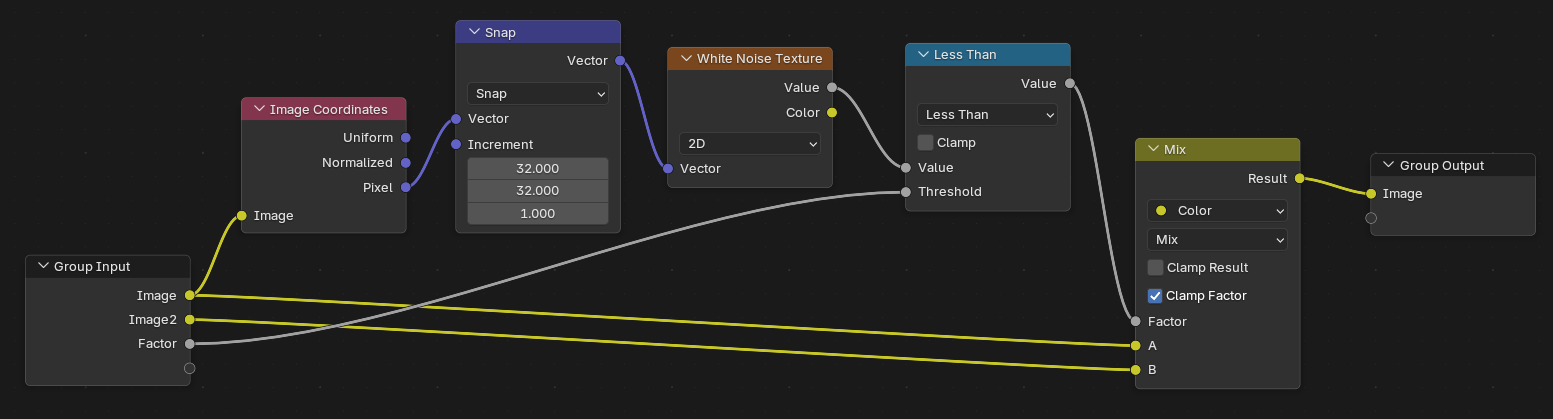
Transitions are perhaps the most common, but you can also have effect strips that do not have any inputs, and just generate an image completely procedurally. This would be useful for any sorts of noise, patterns or other procedural textures.
Custom inputs for compositor based modifiers & effects
While having a node tree to drive a modifier or effect is nice and very flexible, it is of limited use if you need to hardcode every tweakable parameter directly in the node tree. It would be way more useful if you could prepare a node tree once, turn it into an asset, and expose whatever parameters a user might want to tweak as custom inputs. Right? Right.
So that’s what Falk implemented for compositor modifiers in Blender 5.2 (PR #156706), and I did the same for compositor effects in upcoming 5.3 (PR #161026).
More performance around compositor
The initial implementation of compositor modifiers in 5.0 was always using the CPU based compositor. This works, but is not the fastest way of doing large amounts of pixel operations :) And so I spent some time improving various aspects of it:
- The obvious one is, let it use the GPU compositor, when the user has selected the GPU compositor (the GPU compositor has been recently made the default option, by the way). PR #154629
- While at it, also allow using half precision data across the GPU compositor. PR #154914
- Do all colorspace conversions “lazily” (right before they are needed) across the whole VSE rendering stack. Previously, some cases were doing too many “back and forth” conversions, especially when scene linear & display colorspaces are intermixed. This helps compositor use cases (the compositor in Blender always uses scene linear space), but also cases like having sequences of EXR images inside VSE, and so on. PR #156281
- While at it, do compositor colorspace conversions on the GPU, when using the GPU compositor. PR #156640
- Automatically detect when the resulting image of a compositor modifier or strip is fully opaque. The initial implementation used to be conservative, and assumed the result might contain transparency. Which also means that visual strips that are fully beneath the current strip could not be “culled away”, since we did not know if the strip is fully opaque or not. Not anymore! Now it detects any non-opaque-alpha presence (via parallel reduction) and properly marks the result as opaque or not. PR #158600
- Did various optimizations for Mask strips. PR #155853, PR #156518, PR #156622.
There’s still more things to do on the performance front. The most obvious ones being: 1) more of the whole VSE rendering stack being able to use the GPU, and 2) hardware accelerated video encoding/decoding. These (and more) are on the 2026 roadmap, but given how fast time seems to be going, we’ll see how much will actually get implemented this year.
More thumbnails for more things
Image, Movie and Sound strips already had thumbnails, but some other strip types did not. One of the unique features of Blender VSE is that you can directly use other scenes as strips in your timeline, without first rendering them to a video or image sequence. This seems to be used all the time at Blender Studio for storyboarding, for example. Alas, scene strips did not have thumbnails. Well, they will in Blender 5.3 (PR #160322)!

Text, Mask and MovieClip strips also learned how to have thumbnails (PR #151042).
Reduce frame drops around video cuts
It is very common to have an input video file be chopped up into smaller pieces while editing:

However, previously each and every strip maintained its own movie decoder object (internally that contains an ffmpeg decoding context, one or more decoded frame buffers, and so on). Now, a single decoder object is fairly heavy, and can consume like a hundred megabytes of memory (depending on video codec and resolution), so you would not want all the video strips in the timeline to have them open at once. However, initializing and closing these movie decoders is also slow (ffmpeg does whatever it needs to do to open & recognize a file, plus there’s a handful of large memory allocations). What the previous code was doing, is that video strips that are playing right now would keep their movie decoders open, but as soon as the playhead moved past them, they would close now-stale decoders.
Kinda makes sense… except for video cuts. Two strips that would be neighboring, and read the same input video file, still had their own completely separate movie decoders. The one that just finished playing would close the decoder, and the one that just started playing would open its own decoder. Which would do all these heavy memory allocations and ffmpeg stream/codec detection work all over again.
Ugh. This meant that (if you had VSE frame prefetching turned off), for interactive playback you would often get frame drops right around
video cuts; indicated by gaps in the blue line here:
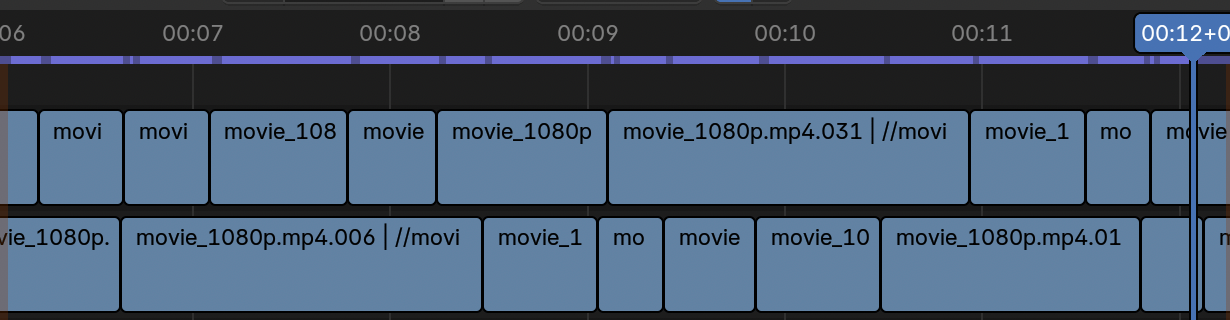
Now of course, frame prefetching (which is on by default) somewhat hides this. But still, doing this heavy work around each and every cut is wasteful.
Well, not anymore! For Blender 5.3 (PR #162451) I have implemented a shared movie decoder pool/cache. No longer does each strip maintain its own movie decoder; instead they are served from a shared cache, and the cache tries to select the most suitable currently-unused decoder, taking into account how far from the needed frame the last decoded video position is, and so on. This not only fixes the interactive playback frame drops, but also saves quite a bit of final render time, when you have many video cuts.
There have been several attempts in the past at fixing this exact issue; I’m quite happy we finally landed one.
Misc
As part of Code Quality Project 2025 I did a whole bunch of cleanups, refactors and ancient code removals across the VSE codebase. Removing code is the best of those, of course :)
I did some speedups and fixes to proxy building for images (PR #152891) and movies (PR #152949), but nothing to write about. Except ha! I just did! My blog, my rules.
As part of an investigation and fixes to some audio related memory leaks, I completely rewrote the external library (Audaspace) integration into Blender code (PR #153386). I wish this had been about some thread safety fixes, so I could quote a song like “I’m gonna send him to Audaspace, find another race”. Alas, this was about memory leaks, so I can’t.
Oh! And the most important thing. Last time I said I became the “lead” of the whole VSE effort. Well, good news, that only lasted like half a year, and I passed the title & responsibility to John Kiril Swenson, who is doing an excellent job. At some point I should learn that each and every time I try to become a “lead” of anything, that only leads to misery for everyone involved.
okay bye!