Unity vs floating point
A tweet by @VehiclePhysics sparked my interest. It basically says:
For most math functions (Sqrt, Sin, Cos, Log, Pow…), prefer
System.MathFoverUnityEngine.Mathf. Unity’s Mathf casts to double, calls the double version, then converts back to float.System.MathFcalls the float-native implementations directly. Less work, same result.
This advice is basically correct! But turns out, things are slightly more complicated.
Hidden double precision in Unity
The advice above applies to all UnityEngine.Mathf methods that deal with
trigonometry (Sin, Cos, Tan, Asin, Acos, Atan, Atan2),
exponentials (Sqrt, Pow, Exp, Log, Log10),
rounding (Ceil, Floor, Round, CeilToInt, FloorToInt, RoundToInt),
comparisons (Min, Max, Clamp, Clamp01) and others (Sign, SmoothStep,
Gamma, Approximately, InverseLerp). About the only function it does not apply to
is Mathf.Abs.
But… why? Well, because C#/.NET originally did not have single-precision
methods for these sorts of math functions. The single precision System.MathF
was introduced in .NET Core 2.0 (year 2017).
Now, you might have expected that almost ten years later, maybe Unity would have noticed this, and made them single precision? Alas, no. There could be potential backwards compatibility issues preventing that (or maybe not! see below).
You also might have guessed that
Unity.Mathematics package,
which was introduced (year 2019) as part of the whole DOTS push, and is modeled to be very similar
to HLSL, would actually do single precision floating point for functions that look like
single precision floating point… and that would be wrong too; for all the trigonometric
and exponential functions like math.sqrt(float x) it routes that into the double
precision C# implementation. Why? I don’t know.
But wait! There is way more double precision. The Mono C# runtime used in Unity does all math in double precision, everywhere. Yes, this means there is a ton of float⭤double conversions from in-memory representation to in-register representation, all over the place. I have first noticed this back in 2018 when doing a toy path tracer, and then Miguel de Icaza did an explanatory blog post, with plans outlined how to switch Mono to use actual floats for floats (yeah!).
“In Mono, decades ago, we made the mistake of performing all 32-bit float computations as 64-bit floats while still storing the data in 32-bit locations.”
Official Mono releases have switched to do that since then, but (I think) for backwards compatibility reasons Unity never enabled that functionality and kept everything at double precision so far.
Note however that the above only applies to Mono. The other two C# language/runtime implementations used across Unity today, IL2CPP and Burst, do not have the “everything is actually double precision” behavior. It is weird that Unity would not switch their Mono version to match; after all some of their main deployment platforms never use Mono (iOS, consoles, web)!
Let’s look at a square root
The above is fairly abstract, so let’s look at what actually happens with a very simple loop that sums up a bunch of square roots:
const int N = 10000000;
public static float UnityMathf(float v)
{
    for (int i = 0; i < N; ++i)
    {
        v += UnityEngine.Mathf.Sqrt(v); // classic Unity
        //v += System.MathF.Sqrt(v); // as advised by the tweet above
    }
    return v;
}
In the Unity editor (6000.0.76, but rough timings are the same on 2022.3, 6000.3 and 6000.6 versions),
on Windows / Ryzen 5950X machine: UnityEngine.Mathf 282ms, System.MathF 186ms.
Whoa indeed, this is way faster!
 But hey! Back in 2018
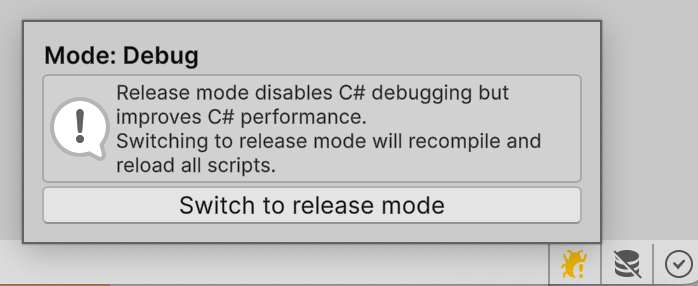
we already found that Unity’s C# performance also very much depends on whether script debugging
is enabled or not. Back then it was called “Editor Attaching” under preferences; these days
it is this bad-contrast-in-light-theme Debug vs Release widget at lower right editor corner.
In Release mode, in-editor timings are:
But hey! Back in 2018
we already found that Unity’s C# performance also very much depends on whether script debugging
is enabled or not. Back then it was called “Editor Attaching” under preferences; these days
it is this bad-contrast-in-light-theme Debug vs Release widget at lower right editor corner.
In Release mode, in-editor timings are: UnityEngine.Mathf 242ms, System.MathF 149ms.
More square roots in more C# variants
To get a more complete picture, let’s also add a variant that uses the “new way of doing math” in Unity, i.e. the Unity.Mathematics package. And have timings for a player build that uses Mono, plus timings for an IL2CPP scripting backend. And while at it, also test performance of the same code under Burst compiler.
| Editor Debug | Editor Release | Player Mono | Player IL2CPP | |
|---|---|---|---|---|
| Mathf | 282 | 242 | 212 | 35 |
| System.MathF | 186 | 149 | 142 | 35 |
| Mathematics | 260 | 211 | 209 | 59 |
| Burst Mathf | 66 | 66 | 67 | 60 |
| Burst Mathematics | 35 | 34 | 34 | 34 |
And for a complete picture, the same loop, using System.MathF.Sqrt (C#) or sqrtf() (C++)
in non-Unity implementations / runtimes:
| C# Mono 6.12 | C# .NET 10 | C++ /O2 | |
|---|---|---|---|
| System.MathF | 130 | 37 | |
| sqrtf() | 35 |
Summary of the above:
- 35 milliseconds to do this loop is “as good as it can get” on this machine, and that is achieved
by C++ & .NET, and within Unity by using Burst + Unity.Mathematics, or when using IL2CPP, with
either of
Mathf.SqrtorSystem.MathF.Sqrt. Under IL2CPP, there does seem to be some special code path that goes “oh this should actually be single precision square root” and generates underlying C++ code accordingly. System.MathFfunctions are not supported by Burst for some reason; if you try to use them you will get Burst compile errors. If you do not need Burst, then System.MathF is often faster. It does make it harder to move code to Burst though.Unity.Mathematicsis often slightly better than the classicMathf, except under IL2CPP, at least for the square root. IL2CPP does not seem to have special recognition of “oh this should be single precision square root” for it, and has other overheads too, see below.- In the opposite behavior to IL2CPP, Burst does not seem to do “oh this should be single precision”
for
Mathf.Sqrt, but it does forMathematics.math.sqrtat single precision.
Also fun fact? All the Unity implementations above print the result of the above loop
as 24212990000000.0, which is curiously not a number that exists as a single precision
float (closest floats that exist are 24212989280256.0 and 24212991377408.0). That’s one
of the signs of “yeah some stuff is always doubles underneath, somewhere”.
The non-Unity (C# .NET, C++) implementations print the result 24212987183104.0.
Welcome to the world! Things are never simple!
Code generation of the square root loops in detail
Mono, UnityEngine.Mathf.Sqrt
As the original tweet says, Unity’s Mathf.Sqrt is implemented like
this: public static float Sqrt(float f) => (float)Math.Sqrt((double)f); – it just
calls into double precision System.Math.Sqrt. But if you look at the actual JIT’ed
machine code generated by Mono, you can see that there is way more float⭤double
conversions going on.
I have used Sebastian Schöner’s Asm Explorer tool to see the generated code. Given this C# code:
const int N = 10000000;
public static float UnityMathf(float v)
{
    for (int i = 0; i < N; ++i)
    {
        v += UnityEngine.Mathf.Sqrt(v);
    }
    return v;
}
the loop body ends up being this:
loop:
movss xmm0, dword [rsp+0x10]     ; xmm0 = v, as float
cvtss2sd xmm0, xmm0              ; xmm0 = (double)v, left side of v + sqrt(v)

movss xmm1, dword [rsp+0x10]     ; xmm1 = v, as float again, argument for sqrt
cvtss2sd xmm1, xmm1              ; xmm1 = (double)v

cvtsd2ss xmm5, xmm1              ; xmm5 = (float)(double)v, rounded back to float
movss [rsp+0x8], xmm5            ; store temporary float argument

movss xmm1, dword [rsp+0x8]      ; xmm1 = temporary float argument
cvtss2sd xmm1, xmm1              ; xmm1 = (double)temporary float

movsd [rsp-0x8], xmm1            ; store double for x87 sqrt input
fld qword [rsp-0x8]              ; push double onto x87 stack
fsqrt                            ; ST(0) = sqrt(ST(0))
fstp qword [rsp-0x8]             ; store sqrt result as double and pop x87 stack

movsd xmm1, qword [rsp-0x8]      ; xmm1 = sqrt result, as double
cvtsd2ss xmm1, xmm1              ; xmm1 = (float)sqrt result
cvtss2sd xmm1, xmm1              ; xmm1 = (double)(float)sqrt result

cvtsd2ss xmm5, xmm1              ; xmm5 = sqrt result rounded to float
movss [rsp+0x8], xmm5            ; store temporary sqrt float

movss xmm1, dword [rsp+0x8]      ; xmm1 = temporary sqrt float
cvtss2sd xmm1, xmm1              ; xmm1 = (double)temporary sqrt float

cvtsd2ss xmm5, xmm1              ; xmm5 = sqrt result rounded to float again
movss [rsp+0x8], xmm5            ; store temporary sqrt float again

movss xmm1, dword [rsp+0x8]      ; xmm1 = temporary sqrt float again
cvtss2sd xmm1, xmm1              ; xmm1 = (double)sqrt result

addsd xmm0, xmm1                 ; xmm0 = (double)v + (double)Mathf.Sqrt(v)

cvtsd2ss xmm5, xmm0              ; xmm5 = final iteration result, round to float
movss [rsp+0x10], xmm5           ; v = final iteration result

inc esi                          ; ++i
cmp esi, 0x989680                ; compare i against 10000000
jl loop                          ; if i < N, continue loop
If this were C#, it would be like v += UnityEngine.Mathf.Sqrt(v) actually expands to:
double lhs = (double)v;

double t0 = (double)v;
float t1 = (float)t0;
float stackFloat0 = t1;
float t2 = stackFloat0;
double sqrtInput = (double)t2;

double stackDouble0 = sqrtInput;
double sqrtDouble = X87_Fsqrt(stackDouble0); // represents x87 FPU fsqrt instruction

float t3 = (float)sqrtDouble;
double t4 = (double)t3;
float t5 = (float)t4;
float stackFloat1 = t5;
float t6 = stackFloat1;
double t7 = (double)t6;
float t8 = (float)t7;
float stackFloat2 = t8;
float t9 = stackFloat2;
double rhs = (double)t9;

double sum = lhs + rhs;
float result = (float)sum;
v = result;
That’s… not exactly great, to put it mildly. Unity is planning to switch to “actual .NET” (CoreCLR) really soon now (see Path to CoreCLR GDC 2026 talk) and codegen should get much better then. Meanwhile, I am rediscovering the same things as what Sebastian Schöner did, but he is also trying to do something about it – see Better codegen for Unity games on Mono blog post.
Using Unity.Mathematics.math.sqrt is a tiny bit better codegen than above, but not by much.
Mono, System.MathF.Sqrt
const int N = 10000000;
public static float UnityMathf(float v)
{
    for (int i = 0; i < N; ++i)
    {
        v += System.MathF.Sqrt(v);
    }
    return v;
}
the loop body ends up being this:
loop:
movss xmm0, dword [rbp-0x10]     ; xmm0 = v, as float
cvtss2sd xmm0, xmm0              ; xmm0 = (double)v
movsd [rbp-0x18], xmm0           ; save old v as double for later addition

movss xmm0, dword [rbp-0x10]     ; xmm0 = v, as float again, argument for MathF.Sqrt
cvtss2sd xmm0, xmm0              ; xmm0 = (double)v

cvtsd2ss xmm0, xmm0              ; xmm0 = (float)(double)v, argument to MathF.Sqrt
nop                              ; padding / alignment / patchpoint artifact

mov r11, 0x22494ee3918           ; r11 = JIT trampoline address for System.MathF.Sqrt(float)
call r11                         ; call MathF.Sqrt(float), argument in xmm0, return float in xmm0

cvtss2sd xmm1, xmm0              ; xmm1 = (double)MathF.Sqrt(v)

movsd xmm0, qword [rbp-0x18]     ; xmm0 = saved old v, as double
addsd xmm0, xmm1                 ; xmm0 = (double)old_v + (double)sqrt_v

cvtsd2ss xmm5, xmm0              ; xmm5 = final iteration result rounded to float
movss [rbp-0x10], xmm5           ; v = final iteration result

inc esi                          ; ++i
cmp esi, 0x989680                ; compare i against 10,000,000
jl loop                          ; if i < N, continue loop
and the assembly of the actual System.MathF.Sqrt function is:
xorps xmm1, xmm1                 ; xmm1 = 0.0f
ucomiss xmm1, xmm0               ; compare 0.0f with input
ja handlefail                    ; if 0.0f > input, input is negative: go handle failure/NaN path
sqrtss xmm0, xmm0                ; xmm0 = sqrtss(xmm0), scalar single-precision sqrt
ret                              ; return sqrt result in xmm0

handlefail:
; some code that handles failures/NaNs
it is effectively this:
static float MathF_Sqrt_Call(float x)
{
    if (0.0f > x)
        return MathF_Sqrt_SlowPath(x);
    return Sse_SqrtScalarSingle(x); // sqrtss instruction
}

// ...
double lhs = (double)v;

double t0 = (double)v;
float sqrtArg = (float)t0;
float sqrtResult = MathF_Sqrt_Call(sqrtArg);
double rhs = (double)sqrtResult;

double sum = lhs + rhs;
float result = (float)sum;
v = result;
There are still a bunch of float⭤double conversions! But way fewer, and instead of using the ancient x87 FPU, this now uses the scalar SSE square root instruction.
Burst, UnityEngine.Mathf.Sqrt
Under Burst, the v += UnityEngine.Mathf.Sqrt(v) inner loop part faithfully translates to:
vcvtss2sd   xmm1, xmm0, xmm0 ; convert float→double
vsqrtsd     xmm1, xmm1, xmm1 ; scalar double precision square root
vcvtsd2ss   xmm1, xmm1, xmm1 ; convert double→float
vaddss      xmm0, xmm0, xmm1 ; float +=
i.e. it does pretty much what you would expect, given Mathf.Sqrt implementation.
Burst, Unity.Mathematics.math.sqrt
The v += Unity.Mathematics.math.sqrt(v) under Burst translates to just:
vsqrtss     xmm1, xmm0, xmm0 ; scalar single precision square root
vaddss      xmm0, xmm0, xmm1 ; float +=
This is basically what you would want to happen.
This is somewhat curious though,
since underlying math.sqrt code is actually public static float sqrt(float x) { return (float)System.Math.Sqrt((float)x); } – i.e. without Burst, it does end up calling into double precision
function. But Burst gives this some sort of special treatment, that it does not do for the
previous case, I guess.
And again, no System.MathF.Sqrt test with Burst, since it just fails if you try to use that.
IL2CPP, UnityEngine.Mathf.Sqrt
Unity’s IL2CPP scripting backend translates .NET bytecode into C++, and then relies on a regular C++ compiler to carry out optimizations.
For the Mathf.Sqrt code path, it does seem to actually give it special treatment – it does not call
the double precision square root, even if on C# level it does do double precision.
This is the opposite of what Burst does, and I guess this is another example of “you ship your org chart”
in action.
The inner loop in generated C++ code is:
float L_0 = ___0_v;
float L_1 = ___0_v;
float L_2;
L_2 = sqrtf(L_1);
___0_v = (float)il2cpp_codegen_add(L_0, L_2); // template function, just + for simple types
which then the C++ compiler (MSVC 2022 v17.14, Release build config) actually unrolls to do ten square roots per iteration, with each square root snippet being this:
xorps       xmm1, xmm1     ; xmm1 = 0.0f
ucomiss     xmm1, xmm6     ; compare 0.0f with v
ja          edgecase       ; if 0.0f > v: use sqrtf fallback function
xorps       xmm0, xmm0     ; xmm0 = 0.0f
sqrtss      xmm0, xmm6     ; xmm0 = sqrt(v), scalar single-precision sqrt
jmp         end
edgecase:
movaps      xmm0, xmm6     ; xmm0 = v, argument for sqrtf
call        sqrtf          ; call C runtime sqrtf
end:
addss       xmm6, xmm0     ; v += sqrtResult
This is not a simple “just use sqrtss”, it only uses the instruction for valid inputs,
and calls into “full” function for others (to set errno or deal with exceptions, I guess).
You could argue that this is less optimal codegen than what Burst does, in practice on
this benchmark it does not matter though.
IL2CPP, System.MathF.Sqrt
Now, for System.MathF the IL2CPP codegen is slightly different:
il2cpp_codegen_runtime_class_init_inline(MathF_longGUID_il2cpp_TypeInfo_var);
float L_0 = ___0_v;
float L_1 = ___0_v;
float L_2;
L_2 = sqrtf(L_1);
___0_v = (float)il2cpp_codegen_add(L_0, L_2); // template function, just + for simple types
– why yes, that is the il2cpp_codegen_runtime_class_init_inline call inside the hot inner
loop. What that does, is it checks some flag and if it is not set, calls some other function.
Some sort of “lazy C# class initialization”, that for some reason is not needed in the previous
case, but is needed here.
In assembly, this looks very much like above, except now the loop body is not “tiny enough” so MSVC compiler does not do ten square roots per each actual loop iteration; it does only one. And before each square root, it does this:
mov         rcx,qword ptr [MathF_longGUID_il2cpp_TypeInfo_var]
cmp         dword ptr [rcx+0E4h],0
jne         inited
call        il2cpp_codegen_runtime_class_init
inited:
Now again, for this particular benchmark it does not matter (the memory address it checks is very
much in the cache, and the branch is perfectly predictable). But if you are calling
System.MathF.Sqrt outside of tiny inner loops, then each.and.every.call will have this extra memory
fetch and a branch.
IL2CPP, Unity.Mathematics.math.sqrt
For the Mathematics.math.sqrt case, things get slightly weirder under IL2CPP: 1) instead of
one “some sort of lazy initialization” branch like in case above, now it has two branches for each
and every call, and 2) the actual square root is done in double precision.
Generated C++ code:
IL2CPP_MANAGED_FORCE_INLINE IL2CPP_METHOD_ATTR float math_sqrt_longGUID_inline (float x, const RuntimeMethod* method)
{
  static bool s_Il2CppMethodInitialized;
  if (!s_Il2CppMethodInitialized)
  {
    il2cpp_codegen_initialize_runtime_metadata((uintptr_t*)&Math_longGUID_il2cpp_TypeInfo_var);
    s_Il2CppMethodInitialized = true;
  }
  {
    il2cpp_codegen_runtime_class_init_inline(Math_longGUID_il2cpp_TypeInfo_var);
    double l1 = sqrt((double)x);
    return (float)l1;
  }
}
which then translates into this assembly for the inner loop:
cmp         byte ptr [s_Il2CppMethodInitialized],0
jne         inited1
lea         rcx,[Math_longGUID_il2cpp_TypeInfo_var]
call        il2cpp_codegen_initialize_runtime_metadata
mov         byte ptr [s_Il2CppMethodInitialized],1
inited1:
mov         rcx,qword ptr [Math_longGUID_il2cpp_TypeInfo_var]
cmp         dword ptr [rcx+0E4h],0
jne         inited2
call        il2cpp_codegen_runtime_class_init
inited2:
xorps       xmm1,xmm1
xorps       xmm0,xmm0
cvtss2sd    xmm1,xmm6
ucomisd     xmm0,xmm1
ja          edge_case
sqrtpd      xmm0,xmm1
jmp         iter_end
edge_case:
movaps      xmm0,xmm1
call        sqrt
iter_end:
cvtsd2ss    xmm0,xmm0
addss       xmm6,xmm0
Again, for this benchmark the two extra branches do not matter, but they might if you are calling math.sqrt not from inside of a tiny
loop body. What does matter, and why under IL2CPP this is slower, is that the square root is done at double precision.
So there! Unity math is complex!
Well, that was something. Is the original advice of prefer System.MathF over UnityEngine.Mathf valid? Yes, unless you want Burst;
there it simply does not work.
My takeaways:
- I hope the upcoming switch to .NET / CoreCLR will clear up a lot of that mess, especially in the “even if you don’t spell out doubles anywhere in your code, Mono does everything in doubles in Unity”. And even without double precision, the Mono codegen is… not great.
- Unity is quite inconsistent in how it treats precision of various math functions. Some of them are implemented as-if
they were double precision, but IL2CPP and Burst magically treat them as single precision. Sometimes IL2CPP and Burst
disagree on which ones get the special treatment.
- Given that CoreCLR switch will have some potential backwards compat breakages anyway, I hope Unity will sanitize the math functions precision treatments in the same go.
- It would be nice if you could use “functions that look & feel the same” (like
UnityEngine.Mathf.Sqrt,System.MathF.SqrtandUnity.Mathematics.math.sqrt) as being exactly equivalent, with no preferential treatment of one vs. the other. That is very much not the case today however, and what’s worse, there is no single answer for “which one is best”. It all depends whether you use IL2CPP or Burst, or both, or neither! - If you want best performance now, use Burst and Mathematics maths.
- Also, you might want to look into Sebastian’s cpp2better, that is aimed at improving IL2CPP codegen. I have not evaluated it in this post however.