Dilemmas
Sometimes you must make decisions that clearly affect your whole foreseeable future in a significant way. Here comes the really unexpected though: making such decisions is hard! :)
Sometimes you must make decisions that clearly affect your whole foreseeable future in a significant way. Here comes the really unexpected though: making such decisions is hard! :)
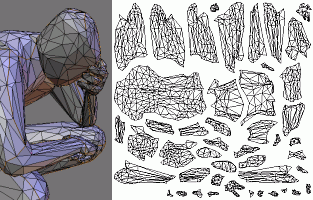 Hey, UV mapping the second human-like figure took me much less time than the first one! This one took about 1 hour, again in Blender (and again, marking seam edges, LSCM that and just arranging resulting pieces rocks).
That said, making the low-poly mesh from the high-poly one took much longer than UV mapping; something like 4 hrs. A good artist would probably make a new mesh from scratch in shorter time, but hey, I’m not an artist :)
Really. Three hours for a model at 1024x1024 and 5x supersampling!
Now I’m using ATI’s NormalMapper to compute normal/AO maps (Previously was using nVidia’s Melody, but switched for no obvious reason). The good thing with NormalMapper is that it comes with sourcecode; I’ve already sped up AO computation about 20% by capping octree traversal distances (that took less than an hour). I suspect with some thought it could be optimized even more.
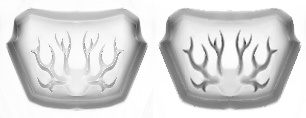 Previously I was using a hacked solution - compute normal map with either tool (that doesn’t take long), then use my custom small tool that does low-order GPU PRT simulation on low-poly normalmapped model with D3DX. Get the first term of results, scale it and there you have ambient occlusion. I was thinking it produces good results, but in the truth is that ‘real’ AO maps look somewhat better, especially for small ornaments that aren’t captured in low-poly geometry.
The good thing about this hacked approach is that it takes ~10 seconds for a model (compare to 3hrs). Using it as a quick preview is great, and the differences between hacked-AO and real-AO aren’t that much visible once you add textures and conventional lighting.
I’m thinking about doing GPU-based AO simulation on the high poly model, with quick-n-dirty UV parametrization; then just fetching the resulting texture in normal map computation tool (afaik, Melody can do that natively; for NormalMapper it would be easy to add I think). With recent DX9 SDK such tool should not take more than 200-300 lines of code (D3DX has both UVAtlas and GPU PRT simulation now). On the other hand, I know that nVidia guys are preparing something similar :)
Update: added image - on the left is hacked-n-fast AO, on the right is real-AO. Ornaments inside aren’t present in low-poly model (only in normal map). Differences are less visible when the model is textured and other stuff is added.
Sometimes I work for 8 hours with almost no results. Sometimes, I can do much more in 3 hours.
Things that help me (examples from IC05 demo): write down a detailed, roughly prioretized task list. If I don’t write it down and keep tasks in my head, I often spend too much time polishing not-so-important features. With task list, I update it constantly; at the same time I get sort of ‘summary’ of remaining work.
Another one: really concentrate. Turn off music (for some reason I can’t work while music is playing… especially if the music is good, I start listening to it), close the doors, tell the child ‘go play with mom instead’ :), etc.
More: disconnect from the net while working :)
An interesting problem: I’m writing my Master’s thesis and have tough time translating smoothie (from Rendering Fake Soft Shadows with Smoothies) and skirt (Smooth Penumbra Transitions with Shadow Maps).
Both thanslate into weird stuff!