Demos and politics

A demo with a political statement: Ultimatum to the World: First Days of the Last War by mfx.

This is good because it has a statement; and we need works that say things that matter. To quote Naomi Klein’s speech:

Do you want to tackle climate change as much as Dick Cheney wants Kazakhstan’s oil? Do you? Do you want universal healthcare as much as Paris Hilton wants to be the next new face of Estee Lauder? If not, why not? What is wrong with us? Where is our passionate intensity?

So respect to mfx for making a demo with a statement. We need more of those. I don’t have enough passion to say things that matter to me; maybe someday I will.

That said, the demo itself is not that good. Whereas in The Ballet Dancer the final “now that everything is lost…” was a culmination of the whole demo, here in Ultimatum to the World the famous Einstein quote does not work at all. Maybe the quote is just too well known.


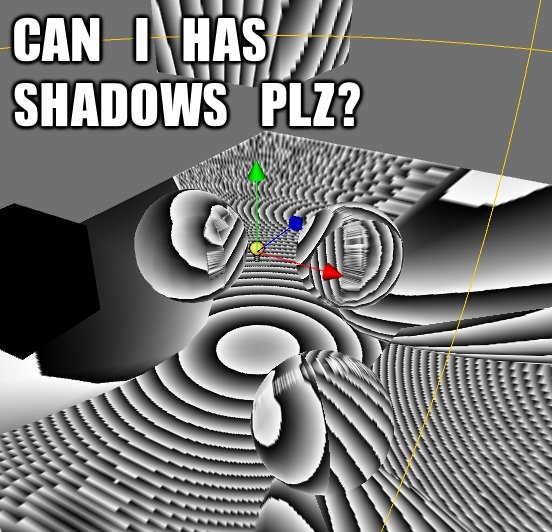
Lolshadows!

In this age of the interwebs we have Lolcats, we even have LOLCODE… why can’t we have Lolshadows?

CAN I HAS SHADOWS? PLZ?

This is actually me debugging point light shadows (that happen to use depth encoded into RGBA8 cubemaps).

OMG ITS POISSON!

This is what happens when you use a too wide Poisson disc blurring in screen space and no prevention of “shadow leakage” over different depths.

LOL! Internet!


Testing graphics code

Everyone is saying “unit tests for the win!” all over the place. That’s good, but how would you actually test graphics related code? Especially considering all the different hardware and drivers out there, where the result might be different just because the hardware is different, or because the hardware/driver understands your code in a funky way…

Here is how we do it at work. This took quite some time to set up, but I think it’s very worth it.

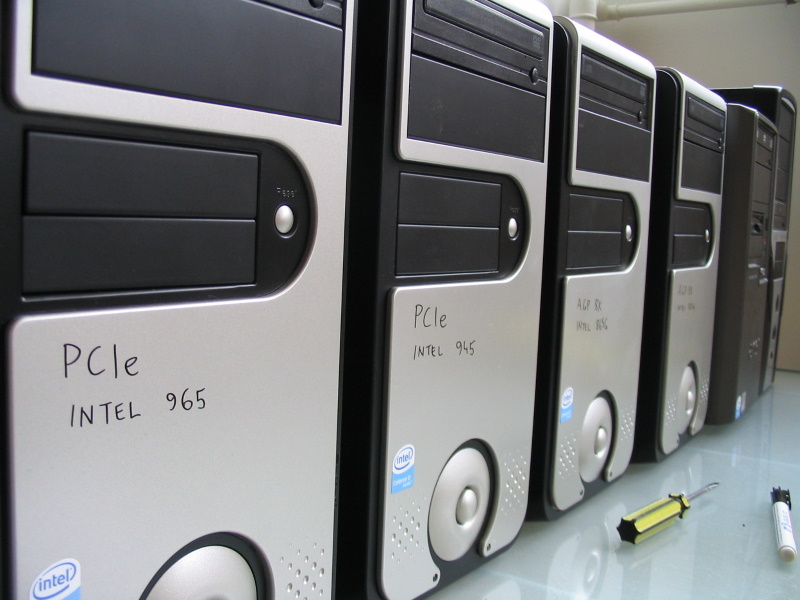
'Testing Lab in action'First you need hardware to test things on. For a start just a couple of graphics cards that you can swap in and out might do the trick. A larger problem is integrated graphics cards - it’s quite hard to swap them in and out, so we bit the bullet and bought a machine for each integrated card that we care about. The same machines are then used to test discrete cards (we have several shelves of those by now, going all the way back to… does ATI Rage, Matrox G45 or S3 ProSavage say anything to you?).

'It looks pretty random, huh?'Then you make the unit tests (or perhaps these should be called the functional tests). Build a small scene for every possible thing that you can imagine. Some examples:

  • Do all blend modes work?

  • Do light cookies work?

  • Does automatic texture coordinate generation and texture transforms work?

  • Does rendering of particles work?

  • Does glow image postprocessing effect work?

  • Does mesh skinning work?

  • Do shadows from point lights work?

This will result in a lot of tests, with each test hopefully testing a small, isolated feature. Make some setup that can load all defined tests in succession and take screenshots of the results. Make sure time always progresses at fixed rate (for the case where a test does not produce a constant image… like particle or animation tests), and take a screenshot of, for example, frame 5 for each test (so that some tests have some data to warm up… for example motion blur test).

By this time you have something that you can run and it spits out lots of screenshots. This is already very useful. Get a new graphics card, upgrade to new OS or install a new shiny driver? Run the tests, and obvious errors (if any) can be found just by quickly flipping through the shots. Same with the changes that are made in rendering related code - run the tests, see if anything became broken.

'My crappy Perl code...'The testing process can be further automated. Here we have a small set of Perl scripts that can either produce a suite of test images for the current hardware, or run all the tests and compare the results with “known to be correct” suite of images. As graphics cards are different from each other, the “correct” results will be somewhat different (because of different capabilities, internal precision etc.). So we keep a set of test results for each graphics card.

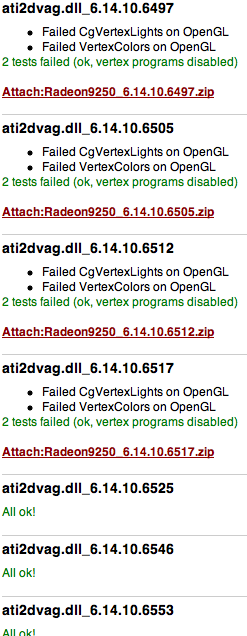
'That’s an awful lot of drivers!'Then these scripts can be run for various driver versions on every graphics card. They compare results for each test case, and for failed tests copy out the resulting screenshot, the correct screenshot, log the failures into a wiki-compatible format (to be posted on some internal wiki), etc.

I’ve heard that some folks even go a step further - fully automate the testing of all driver versions. Install one driver in silent mode, reboot the machine, after reboot runs another script that launches the tests and proceeds with the next driver version. I don’t know if that is only an urban legend or if someone actually does this*, but that would be an interesting thing to try. The testing per card then would be: 1) install a card, 2) run the test script, 3) coffee break, happiness and profit!

* My impression is that at least with the big games it works the other way around - you don’t test with the hardware; instead the hardware guys test with your game. That’s how it looks for a clueless observer like me at least.

So far this unit test suite was really helpful in a couple of ways: making of the just-announced Direct3D renderer and discovering new & exciting graphics card/driver workarounds that we have to do. Making of the suite did take a lot of time, but I’m happy with it!


Can you set OpenGL states independently?

Most of the time, yes, you can just set the needed states! You can set alpha blending on and turn light #0 off, and often nothing bad will happen. Blending will be on, and light #0 will be off. Fine.

Until you hit a graphics card (quite new - from 2006, it can even do pixel shader 2.0) that completely hangs up the machine in one of your unit tests. In fact, in the first unit test, that does almost nothing. Debugging that thing is total awesomeness - try something out, and the machine either hangs up or it does not. Reboot, repeat.

After something like 30 hang-ups I found the cause: you are damned if you set GL_SEPARATE_SPECULAR_COLOR and GL_COLOR_SUM to different values (i.e. use separate specular but don’t turn on color sum). Because, you know, some code was there that did not see a point in changing light mode color control when no lighting was on. So yeah, always set those two in sync. Just to please this card’s drivers.

It’s hard for me to have any faith in driver developers. I know that their job is hard, walking the fine line between correctness and getting decent benchmark scores… But still - hanging up the machine when two OpenGL 1.2 states are set to different values? Would you trust those people to write full fledged compilers?


Electronic Arts STL

A paper on Electronic Arts’ implementation of Standard Template Library.

Is it insane or the only sane thing to do? It’s insane amount of work, but it looks like they know what they’re doing. STL is broken in many ways, especially on memory limited systems… Now they could release it as open source with a decent license!